

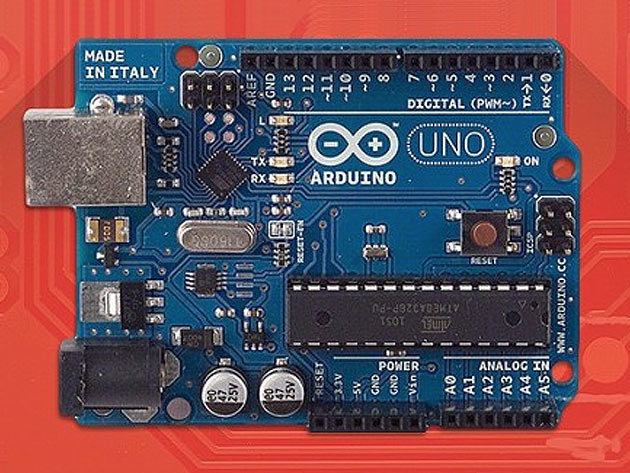
Arduino Step by Step: Your Complete Guide Course

Arduino Step by Step: Your Complete Guide Course

217 Enrolled
22 Hours
Deal Price$21.00
Suggested Price
$50.00
You save 57%
Arduino Step by Step: Your Complete Guide Course
$21.00$50.0057% OFF
Arduino Step by Step: Your Complete Guide

131 Lessons (22h)

  • Introduction
    Introduction
    Please read this before continuing!
    List of parts
    A study guide - Please view this first!
  • Getting started with the Arduino
    The Arduino ecosystem
    Arduino ecosystem - quiz
    Tools and prototyping workflow
    Let's make a light blink!
    LED blinking - quiz
    Make the LED fade on and off
    LED fading - quiz
    Tools and prototyping - quiz
  • Sensors
    About sensors
    Measuring light
    Measuring light - Quiz
    Temperature and humidity
    Temperature and Humidity - Quiz
    Barometric pressure sensors
    Barometric pressure sensors - quiz
    Infrared motion sensors
    Infrared motion sensors - Quiz
    Ultrasonic distance sensor
    Ultrasonic distance sensors - Quiz
    Detecting acceleration
    Detecting acceleration - quiz
    Line sensor (infrared)
    Line sensor - quiz
    Tilt and impact
    Tilt and impact sensors - quiz
  • Interaction
    Buttons
    Buttons - quiz
    Potentiometer
    Potentiometer - quiz
    The flex sensor
    Flex sensor - Quiz
    Membrane potentiometer
    Membrane potentiometer - quiz
    Making noise with a passive buzzer
    Making noise with a buzzer - quiz
    Keypad, Part 1: Introduction
    Keypad, Part 2: Parallel connection wiring
    Keypad, Part 3: Parallel connection sketch
    Keypad, Part 4: Single wire connection
    Keypad, Part 5: Single wire connection conclusion
    Hardware button deboucing
    Rotary Encoders Part 1: Background and Principle of Operation
    Rotary Encoders Part 2: A Simple Circuit demo
    Rotary Encoders Part 3: Adding Debouncing
    Fingerprint sensor Part 1: About
    Fingerprint sensor Part 2: Wiring, registering, recognizing
    Fingerprint sensor Part 3: App demo with an electric door lock
  • Displays
    LCD character screen, Part 1
    LCD character screen, Part 2
    Single data wire LCD and I2C, Part 1
    Single data wire LCD and I2C, Part 2
    LCD and Keypad mini-project
    LCD TFT screen
    Quiz for the LCD TFT lecture
    Seven Segment LED Displays, Part 1: Intro and assembly
    Seven Segment LED Displays, Part 2: Sketch
    Control an 8x8 LED matrix display with the MAX7219 controller
    Visualise ADXL335 accelerometer data on an 8x8 LED matrix display
    Control multiple 8x8 LED matrix displays
  • Motors
    Direct current motors, Part 1
    Direct current motors, Part 2
    Direct current motors, Part 3
    Exercises for the Direct Current motor lectures
    Servo motors, Part 1
    Servo motors, Part 2
    Exercises for the servo motor lectures
    Servo motors and LCD screens mini project
    Stepper motors Part 1: Introduction
    Stepper motors Part 2: Connecting a unipolar un-geared motor
    Stepper motors Part 3: Controlling a unipolar un-geared motor
    Stepper motors Part 4: Connecting a unipolar geared motor
    Stepper motors Part 5: Using the AccelStep library
    EasyDriver with the NEMA17 stepper motor
  • Ethernet and Internet communications
    The Ethernet shield, Part 1
    The Ethernet shield, Part 2
    A simple Arduino reporting web server, Part 1
    A simple Arduino reporting web server, Part 2
    A simple Arduino reporting web server, Part 3
    Simple reporting server - Mini project
    An Arduino controlling web server
    Controlling web server - Mini projects
    Controlling a motor with a web browser
    Web motor control - Mini projects
    Web logging to Nimbits, Part 1
    Web logging to Nimbits, Part 2
    Nimbits Lecture - Mini project
    Social logging to Twitter
    Logging to Twitter - Mini project
  • Wireless communications
    Wireless connectivity with Bluetooth, Part 1
    Wireless connectivity with Bluetooth, Part 2
    Bluetooth - Mini projects
    Wifi connectivity, Part 1 of 4
    Wifi connectivity, Part 2 of 4
    Wifi connectivity, Part 3 of 4
    Wifi connectivity, Part 4 of 4
    Wifi connectivity: upgrading your CC3000 module
    Using the NRF24L01+ transceiver module
    Bluetooth Low Energy Part 1: About BLE
    Bluetooth Low Energy Part 2: The Adafruit nRF8001 module
    Bluetooth Low Energy Part 3: UART demos
    Bluetooth Low Energy Part 4: Firmata demo
  • External storage
    Reading and writing to an SD card, Part 1 of 3
    Reading and writing to an SD card, Part 2 of 3
    Reading and writing to an SD card, Part 3 of 3
    SD Card lecture - Mini project
    EEPROM (internal and external) Part 1: Basic use
    EEPROM (internal and external) Part 2: the EEPROMex library
    EEPROM (internal and external) Part 3: Using an external EEPROM
  • Taking a closer look at the Atmega microcontroller
    Hardware interrupts Part 1: Introduction
    Hardware interrupts Part 2: Using volatile variables
    Hardware interrupts Part 3: Timers
    Hardware interrupts Part 4: High-definition Pulse Width Modulation
    Using the build-in pull-up resistors
    Memory management Part 1: Introduction and Flash
    Memory Management Part 2: Static RAM
    Power management with sleep mode and prescaling
  • Integrated circuit peripherals
    Hardware switch/button debouncing Part 1: Background
    Hardware switch/button debouncing Part 2: Demo
    Shift registers Part 1: What are shift registers
    Shift registers Part 2: 8-LED circuit
    Shift registers Part 3: 8-LED circuit
    Shift registers Part 4: 16-LED circuit
    Control more devices with a port expander, Part 1: Background and setup
    Control more devices with a port expander, Part 2: more examples
    Real time clock, Part 1 of 2
    Real time clock, Part 2 of 2
  • Controlling large loads with relays and friends
    Using the TIP22 transistor to control an LED strip
    Relays Part 1: Introduction
    Relays Part 2: How NOT to control a relay
    Relays Part 3: Connect a 12V relay component calculations
    Relays Part 4: Connect a 12V relay connections
    Relays Part 5: Relay shields
  • Location sensing
    GPS Part 1: An introduction
    GPS Part 2: Wiring the Adafruit module for direct communication with computer
    GPS Part 3: Getting and using raw text data from the module
    GPS Part 4: Using the Adafruit GPS library
    GPS Part 5: Using the TinyGPS+ library
  • Topics on prototyping
    Bare-bones Arduino Part 1: Intro and power circuit
    Bare-bones Arduino Part 2: Atmega, reset and clock
    Bare-bones Arduino Part 3: Power LED and testing
    Create your own printed circuit boards (PCB), Part 1
    Create your own printed circuit boards (PCB), Part 2
    Using Processing (the language) with the Arduino, Part 1
    Using Processing (the language) with the Arduino, Part 2
    Create your own Library, Part 1
    Create your own Library, Part 2
  • Quick explorations
    Arduino-Raspberry Pi wireless communication with the RF24
    A home notification board with a large display
    Using a magnetometer to detect motion
    Cheap but reliable wireless communication
  • Video responses
    Timing infrared beam interrupts (simulated by buttons)
    My Arduino and NRF24L modules not communicating. Why?
    Arduino and Wii Nunchuck problems - how should it behave?
    What’s wrong with my I2C module/bridge to LCD screen?
    Controlling piezo buzzer loudness with a potentiometer
    Using an RC filter for better motor contorl
    Resistor with photoresistor circuit setup and voltage measurement
  • Wrapping-up...
    Instead of a conclusion
  • Appendices
    Where can you find the source code for the demo sketches?
Arduino Step by Step: Your Complete Guide Course
$21.00$50.0057% OFF
View similar items
DescriptionInstructorImportant DetailsRelated Products

Master Arduino to Start Building Your Own Microcontrollers & Harnessing Electronics

PD
Peter Dalmaris

Instructor

Peter Dalmaris is Chief Explorer at Tech Explorations. He is fascinated by technology because of its ability to make amazing things happen, and science because of its ability to make nature transparent. He is an Electrical and Computer Engineer, has a PhD (most of which was spent reading philosophy of knowledge) and a couple of Masters in Information Systems. He has been a lecturer for over 13 years in a variety of IT (and occasionally management) subjects. During this time, he has developed a hands-on teaching style, whereby he invites and challenges his students to learn by doing. He has taught thousands of students in dozens of undergraduate and postgraduate courses.

Peter is also a software developer at Futureshock Enterprises, making applications using Ruby, Ruby on Rails, and iOS. Peter has been an electronics enthusiast since he remembers himself when he wrecked his sister's digital watch and his parents VCR. He replaced the watch but managed to fix the VCR. Now, he is particularly fascinated by the rapid prototyping opportunities that the Arduino and similar platforms has brought about. He lives in Sydney, Australia.

For more details on this course and instructor, click here. This course is hosted by StackSkills, the premier eLearning destination for discovering top-shelf courses on everything from coding—to business—to fitness, and beyond!

Description

Created in 2005 by students at the Interaction Design Institute in Italy, Arduinos are microcontrollers that make the creation of interactive electronic devices accessible and fun. The Arduino unit analyzes its environment by receiving inputs from numerous built-in sensors and reacts by controlling lights, motors, accessories or whatever else you can dream up. This is the all-encompassing course that will teach you how to master this fun and useful technology.

  • Access 131 lectures and 22 hours of content 24/7
  • Learn how to program in the Arduino prototyping platform
  • Understand the principles of programming micro-controllers
  • Explore basic principles in electronics design
  • Study and use many types of sensors and components
  • Connect your Arduino to the Internet for reporting and controlling
  • Use tools to build electronic devices

Specs

Important Details

  • Length of time users can access this course: lifetime
  • Access options: web streaming
  • Certification of completion included
  • Redemption deadline: redeem your code within 30 days of purchase
  • Experience level required: all level

Requirements

  • No experience required
  • You will need to purchase an Arduino controller in order to complete the hands-on aspects of the course

Terms

  • Unredeemed licenses can be returned for store credit within 30 days of purchase. Once your license is redeemed, all sales are final.
Your Cart
Your cart is empty. Continue Shopping!
Processing order...